Friday, June 2, 2017

Generating release version apk file in Oracle Jet

To release your application to users you need to create a release-ready package that users can install and run on their Android-powered devices. The release-ready package contains the same components as the debug APK file — compiled source code, resources, manifest file, and so on — and it is built using the same build tools. However, unlike the debug APK file, the release-ready APK file is signed with your own certificate and it is optimized with the zip align tool.


Package the Android version of your app

In this section:
  • Generate a private key.
  • Refer to that key in a configuration file.
  • Create the package.


Step 1: Generate a private key

To sign your app, create a keystore. A keystore is a binary file that contains a set of private keys. Here's how you create one.
  1. Open a Command Prompt in administrator mode.
  2. In the Command Prompt, change directories to the %JAVA_HOME%\bin folder.
    (For example: C:\Program Files (x86)\Java\jdk1.7.0_55\bin).
  3. In the Command Prompt, run the following command.
    keytool -genkey -v -keystore c:\my-release-key.keystore -alias Ansh
    -keyalg RSA -keysize 2048 -validity 10000
    
    Replace my-release-key.keystore and Ansh with names that make sense to you.
  4. You'll be asked to provide a password and the Distinguished Name fields for your key.
    This series of responses gives you an idea of the kinds of information you'll provide for each prompt. Like in the previous command, respond to each prompt with information that makes sense for your app.
    Enter keystore password: pwd123
    Re-enter new password: pwd123
    What is your first and last name?
    [Unknown]= Anshuman Panda
    What is the name of your organizational unit?
    [Unknown]= ABC
    What is the name of your organization?
    [Unknown]= XYZ
    What is the name of your of your City or Locality?
    [Unknown]= Bangalore
    What is the name of your State or Province?
    [Unknown]= KA
    What is the two-letter country code for this unit?
    [Unknown]= IN
    Is CN=Anshuman Panda, OU=ABC, O=XYZ, L=Bangalore, ST=KA, C=IN correct??
    [no]=  y
    
    
    After you provide this information, output like this appears in the Command Prompt.
    Generating 2,048 bit RSA key pair and self-signed certificate (SHA256withRSA)
    with a validity of 10,000 days for: CN= Anshuman Panda, OU= ABC, O= XYZ,
    L=Bangalore, ST=KA, C=IN
    
    Enter key password for <Ansh>
        (RETURN if same as keystore password):
    
    The Android SDK generates the keystore as a file named my-release-key.keystore and places that file in the C:\ drive. The keystore contains a single key, valid for 10000 days.


Step 2: Refer to the private key in a configuration file


Add the below in buildConfig.json à

{
 "android": {
     "release": {
         "keystore":"c:\\my-release-key.keystore",
         "storePassword":"anshuman",
         "alias":"AnshKey",
         "password":"anshuman",
         "keystoreType":""
       }
   }
}

Step 3: Create the package


grunt build --platform={android|ios} [--buildConfig=path/buildConfig.json]


grunt serve:release --platform=android --buildConfig=buildConfig.json


e.g. grunt serve:release --platform=android --buildConfig=D:/build.json

Adding Plugin in Oracle Jet to check if the app is connected to network or not

In case you have a scenario where you need top show some message or do something in your Jet application when you are online or offline then you need to add a plugin (cordova-plugin-network-information) in  your app.

Go to the Hybrid folder in your app and run the following command as shown below

cordova plugin add cordova-plugin-network-information


Adding a new platform to your existing Jet Application

Suppose you have a ios application created in Oracle Jet and you want to add android platform also and want to run your application in Android platform also then navigate to the hybrid folder of your application in command prompt and run the below mentioned command one by one

cordova plugin save

cordova platform rm android


cordova platform add android

Setting Proxy in Android Emulator

Go to Your Android Studio SDK Location in command Line  . The default location is as follows -->

C:\Users\anshpand\AppData\Local\Android\sdk\tools

After navigating to the SDK location, start your emulator using the following command 

emulator -avd Nexus_5_API_23 -http-proxy www-my.proxyserver.com:80


Here Nexus_5_API_23 is the name of your emulator.

Thursday, June 1, 2017

Installing Oracle JET for Web or Hybrid-Mobile Application Development

What is Oracle JET?

Before discussing how to install the Oracle JET tooling, for anyone not familiar with Oracle JET let's take a quick recap.
Image title
At its simplest: Oracle JET is a JavaScript toolkit designed to allow you to build client-side applications for both web and hybrid mobile applications too, using a combination of HTML5, CSS3 and JavaScript.  It harnesses a number of modern open-source libraries and frameworks including RequireJSKnockoutjQuery, and Cordova to build apps. In addition, JET extends upon these by providing a rich UI component set including data visualization components, with built-in accessibility and support for internationalization, web and mobile app templates, and command line tooling.

How to Install Oracle JET for Web or  Hybrid - Mobile Application Development

From a developer's perspective looking to start out with Oracle JET by simply installing it, it's useful to explain that Oracle JET is logically split into tooling, that is the code libraries, command line scripts & utilities you will use to build your JET app, and the actual Oracle JET runtime which is the HTML, JavaScript and CSS that runs in the browser or mobile app.
In developing pure web applications (I hope to cover hybrid-mobile apps in another article) using Oracle JET, JET uses several well-known & popular Open Source packages:
Image title
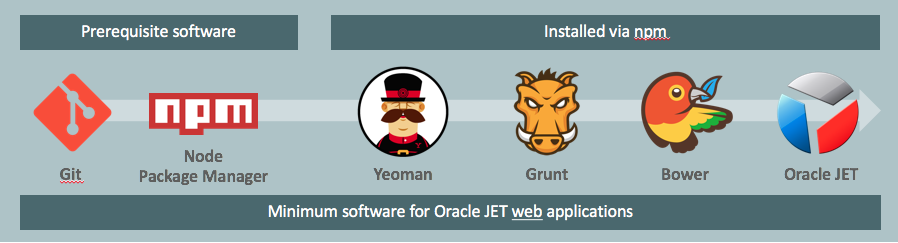
  • NodeJS's Node Package Manager – used to install the other developer packages
  • Git – in conjunction with Github provides access to the source for the other packages
  • Yeoman – a web application scaffold tool for creating the shell of each JET app
  • Grunt – akin to make files of old, used to run tasks to build and run JET apps
  • Bower – separate to npm designed to download front-end runtime artefacts
  • Oracle JET – the JET tooling and runtime that uses ND extends the other tooling

      To install the prerequisite packages:
  1.  Install Git
       Install Git on your development machine.
       From a web browser, download Git, selecting the version and instructions appropriate            for your OS.

Note:
If you’re installing onto a Windows machine, install as Administrator and select the indicated options in the following dialogs:
  • In the Adjusting your PATH environment dialog, choose Use Git from the Windows Command Prompt.
  • In the Configuring the terminal emulator to use with Git Bash dialog, choose Use Windows’ default console window.
  1. Install Node.js
  2. Install the Tooling Packages

  • Install Yeoman:   npm install -g yo
  • Install Grunt  npm install -g grunt-cli
  • Install Bower  npm install -g bower


Note:
After installing  Bower to configure a proxy server, you must add the proxy definitions to the .bowerrc file (C:\Users\ansh) in your home directory. For example:


{
  ...
  "proxy": "http-proxy-server-URL:port-number",
  "https-proxy": "https-proxy-server-URL:port-number",
  ...
} 


Install Yeoman, Grunt , Bower all together 

npm -g install yo bower grunt-cli


Install the Oracle JET Yeoman Generator

npm -g install generator-oraclejet


If you use a proxy server, configure HTTP_PROXY and HTTPS_PROXY environment variables.
The process to set the environment variables depends upon your development environment:

npm config set proxy http-proxy-server-URL:proxy-port
npm config set https-proxy http://my.proxyserver.com:80


git config --global http.proxy http://my.proxyserver.com:80
git config --global https.proxy http://my.proxyserver.com:80


Create Web Application

After installing the Oracle JET Yeoman generator, you can create a new project with:
yo oraclejet <project name> --template=navdrawer


yo oraclejet Ansh_Jet --template=navdrawer


Run Web Application
Once your project has been created, you can serve it by running:

cd <project name>
grunt build
grunt serve

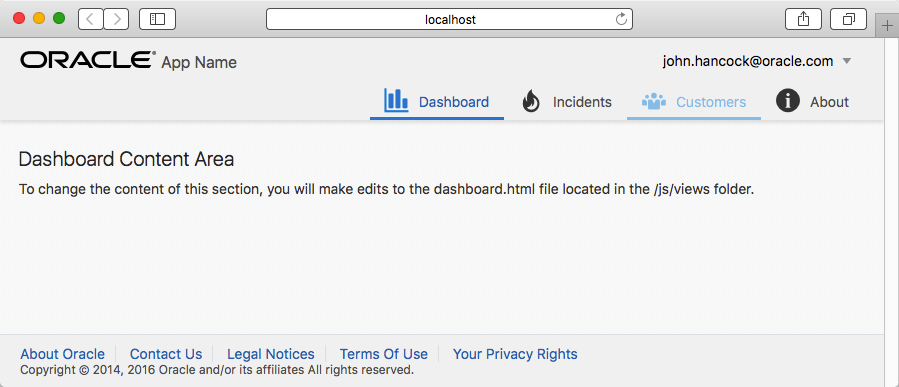
And after a second or so you should see the running app built upon the template "navbar" shell in your default browser:
Image title


Create Mobile Application


Create a mobile application or take your JET based application to a mobile device:

npm -g install cordova
yo oraclejet:hybrid <project name> --platforms=ios|android


yo oraclejet:hybrid Ansh_Jet --platforms=android

Run Mobile Application

grunt build:dev --platform=android

grunt serve:dev --platform=android --livereload=true

Command
Description
grunt serve --platform=android --web=true
Launches the application in the default local browser using the Alta Android theme.
grunt serve --platform=ios
Launches the application in the iOS Simulator using the Alta iOS theme.
grunt serve --platform=android --destination=emulator-name
Launches the application in the specified emulator. For example, use Nexus7 to specify an AVD that you named Nexus7. The emulator name is case-sensitive.
grunt serve --platform=android --destination=device
Launches the application in an attached mobile device.

Push notification in Oracle JET Hybrid application

Below are the main steps involved: First android device sends Sender ID, application ID to GCM/FCM for registration Upon successful reg...